
Know when they're coming home.
When your partner shares their roster, you get their whole swing — and a real-time alert the moment they leave site and when they land back home. No subscription. No catch. Ever.
A promise, not a tier
The family experience is free. Always.
Partner and family sharing is free on every plan, forever — it's non-negotiable, and it's a full experience built for you, not a stripped-back version of the worker's app.
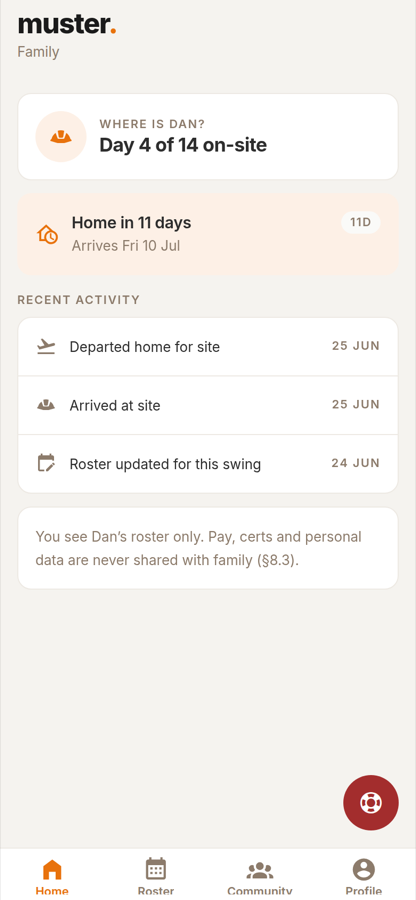
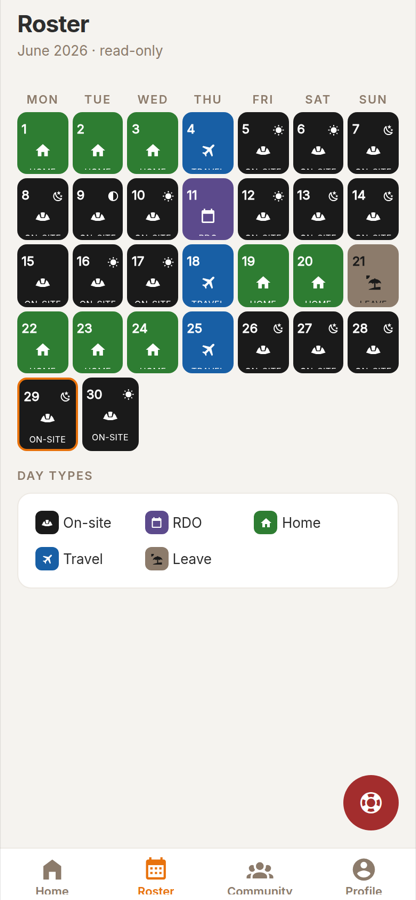
Their whole swing
The full roster in detail — on-site, RDO, travel and leave — plus a countdown to the next departure and the next arrival home.
Real-time alerts
Choose your notifications: 12 hours and 2 hours before they leave, when they depart, when they arrive at site, and when they're on their way home.
Everyone at once
Connected to more than one FIFO worker? See an "everyone home" view so you can plan around the whole family's swings.
Clear boundaries
You see the roster. Nothing private.
The connection is about being together, not oversight. Their pay, contract, certs and wellbeing stay theirs — full stop.
Family sees
- Roster & day types
- Departure & arrival times
- Shared community feed
- Photo competition voting
Family never sees
- Pay, payslips or contracts
- Certs or career data
- Fatigue or wellbeing check-ins
- Expenses or tax
Getting connected
About 30 seconds to set up.
Pick "family member"
On the welcome screen, choose that you're a family member or friend of a FIFO worker.
Enter their invite code
Pop in the 6-digit code they share and you're connected on the spot — or search for them and send a request they approve.
See their roster
That's it. Their swing appears, and your alerts start. Either of you can pause or end the connection any time, in one tap.

Found Muster first?
Get your worker on it.
Partners are often first to notice a pay shortfall or that the stress is building. If you found Muster first, you can invite your worker in a tap — and connect the moment they're in.
Support for families too
FIFO life is a lot on the ones at home, as well.
The same helplines are on every screen for you, with family-specific resources. Your own wellbeing check-ins are private — never visible to your worker.